Skip to content
A scene from Ireland

2012

Writing for LWN

I like to write articles for LWN.net from time to time. Recently I wrong about the recently announced "f2fs" file system (https://lwn.net/Articles/518988/) and might follow it up with a couple more reviews of other filesystems. One challenge is thinking of - or finding - interesting things to write about. I'm not expecting my loyal readership to do my work for me and provide topics, and any suggestions about general areas of interest that might spark some idea for me would not be unwelcome....

GIT

You can find a number of "git"trees at

http://git.neil.brown.name/

or access them via

git://git.neil.brown.name/

just add the project name to the end of that URL.

Contact

If you want to ask me something about software RAID in Linux, i.e. about the "md" driver or "mdadm", then please send email to "linux-raid@vger.kernel.org".

Otherwise you could try emailing me as neil at brown dot name.

If you don't get a reply in a week, feel free the resend the email, but please don't resend sooner than that.


A new blog...

I'm moving my neil.brown.name site to a new home (off in the cloud with better network connectivity - thanks Orion) and so thought it was probably time to try out different blog software.

Previously I have been using a python script I hacked up myself based on something someone else had done. That was fun and a good start to learning python, but the functionality was always minimal and while I often put up with minimal functionality in exchange for having built it myself there comes a point where I want to move on.

About

My name is Neil Brown and my life divides neatly into my family, my faith, and my career, which unfortunately doesn't start with 'f'. My family is private and I won't be blogging about it. My faith is in my Lord Jesus Christ and I'll probably write about him from time to time. My career involves computers and open source software, mostly Linux. That is what I write about the most. But maybe you weren't wondering about me, but rather about the photo I have at the top of each page. I took that in Ireland when I was there in April 2008. It was over on the west coast somewhere near the Cliffs of Moher. All the time we were in England and Scotland (except one day) it was grey or raining. The three days we were in Ireland it was gloriously sunny. This was one of those days. Or possibly you wanted an explanation of the title of this blog. If you've read Jane Austin you shouldn't need an explanation, and if you haven't read her then you should. However for the impatient, let me guide you to my first blog entry in this new site.

Linux 3.5 on the GTA04

Linus released Linux-3.5 a couple of days ago so it is long past time to have 3.5 available for the OpenPhoenux GTA04. By the time I publish this blog entry it will be, both on github at https://github.com/neilbrown/linux/tree/gta04/3.5.y and on my own server at http://neil.brown.name/git?p=gta04;a=shortlog;h=refs/heads/3.5-gta04.

Quite a lot has gone into 3.5-gta04. A lot of that was bug fixes. 3.5 seems to have more changes that break my phone than other recent kernels, though I haven't counted bugs or hours so that could be misleading. Certainly I have quite a lot of patches in my 'bugs' branch which is mainly for fixing regressions, but then 8 of those are all related: the libertas has a new async firmware loader which seems to be broken. I haven't examined it closely, but wifi didn't work until I revert those patches.

On a happier note I've found time to make various improvements.

BULLET - Wifi reset is now handled directly by the mmc driver, rather than having a pseudo regulator do it for me. This is mostly just a code clean up, but it does mean that the voltage is now set correctly on the wifi regulator. That doesn't seem to change performance significantly but I haven't looked closely.

BULLET - The OMAP serial ports can how have a 'virtual DTR' which is a GPIO line that transitions up or down as the device is opened or closed. This allows the next two point...

BULLET - The bluetooth is automatically powered up when /dev/ttyO0 is opened, and powered down when it is closed. This is much nicer (more automatic) than having an 'rfkill' device. So running hciattach /dev/ttyO0 any will power on the device, and killall hciattach will turn it off. Simple. Power is turned off when the device suspends too so you don't need to kill hciattach before suspend.

BULLET - Rather more interestingly, the GPS is now turned "on" or "off" when /dev/ttyO1 is opened or closed. This is rather tricky as both changes require the same down/up pulse on a gpio and it is not trivial to know if the device is currently on or off. But I have a driver that manages all of that - it watches the RX line for traffic whenever the GPS should be off and pulses the line again if needed. This is particularly important at boot - if the GPS is found to be on at boot it is immediately turned off. After that its state should stay in sync with expectations. When turned 'off' the GPS is not actually off - it does maintain some state and seems to use extra current though I'm not completely sure of that yet. I don't know of any way to turn the GPS off more firmly. The virtual-DTR line doesn't turn off power to the antenna - that still requires an 'rfkill'. If the GPS is partly on when it is officially 'off', it might be useful to leave the antenna on so it can monitor satellites occasionally. Until I know exactly what turning it off means I don't want to exclude the possibility of GPS off but antenna on. For now I have created /etc/gpsd/device-hook to call 'rfkill' as appropriate, and made 'rfkill' setuid - rather horrible but it works for now.

BULLET - The GPIO that is used to sense the state of the GPS antenna is now reported using the new 'extcon' (external connector) framework. /sys/class/extcon/gps_antenna/state will contain either 'internal' or 'external' as appropriate. When there is a change a UEVENT is created so e.g. udev could be configured to do something interesting.

BULLET - The wakeup signal from the GSM/3G chip is now an input key rather than a bare 'gpio' line. This makes it easier to integrate with the auto-suspend code. To get notifications of wakeups you need to open the right /dev/input/event device and listen for key presses of KEY_UNKNOWN. The GTA04/udev-rules/input.rules file has the necessary udev magic to make the right file appear as /dev/input/incoming.

I think that is all. Power management seems to be largely unchanged - 25mA when in suspend, about 70mA when idle, awake, screen off, and about 200mA when idle and awake with screen on. I'll be using this on my phone on a regular basis and see how it goes.

OpenPhoenux Serial Console Access

I find that serial console access is a must for debugging kernel problems on the GTA04 board in my OpenPhoenux phone. Getting serial console access to the board itself is quite easy as it has a little connector on the board, and came with a ribbon cable which plugs in to this connector and has a DB-9 on the other end.

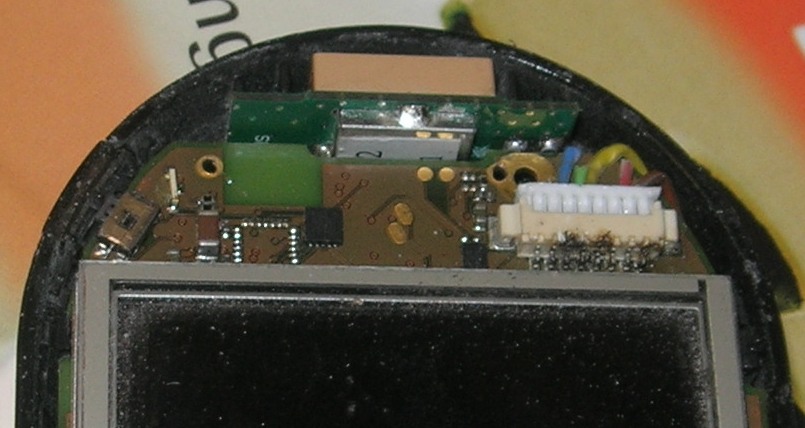
However it isn't so easy when the board is in the phone case, which is where it is most useful. The connector is on the side of the board closest to the front of the phone, just above the display. Cutting a hole there might be possible, but having a ribbon cable hanging out isn't really an option. So I needed to be a little more clever.

Firstly I destroyed the ribbon cable, keeping the brown, yellow, and blue wires and cutting the rest off at the plug. The three wires I kept about 2cm of length on. You can probably see some solder burns from an earlier experiment where I tried to solder 3 wires directly onto the pins at the back of the plug. That worked a little bit, but they kept breaking off. Maybe I'm not good a soldering, or maybe it was just a bad idea.

As you can see in this picture, the wires are feed around the edge of the board the the back. They are aiming for the little cavity beside the battery.

image

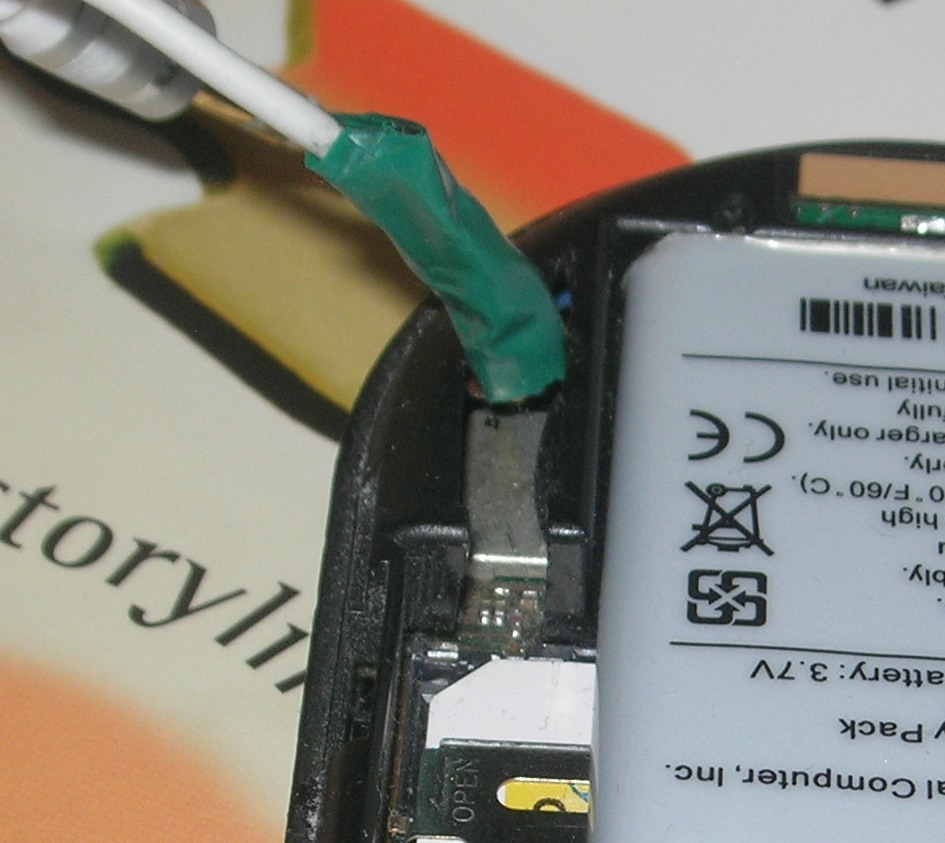
Then I cut away some plastic to make a hole big enough for a small cable with tap wrapped around it, shown here.

image

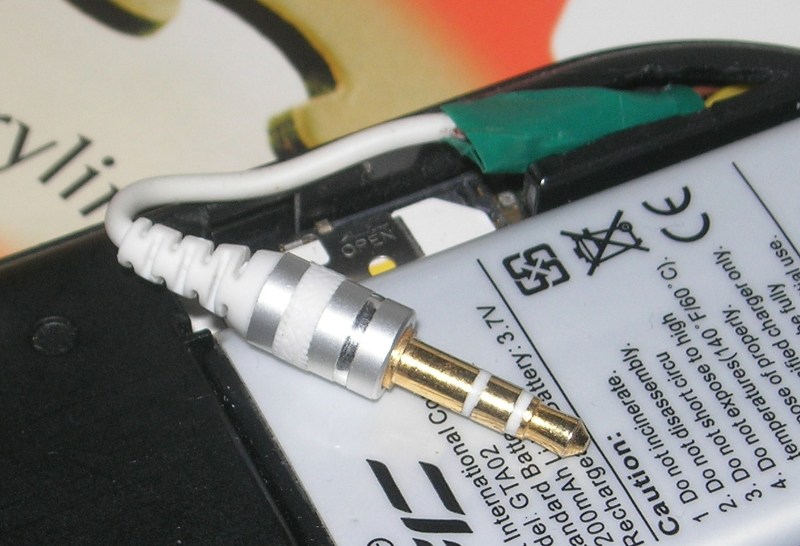
Next I found a nice small 3.5mm stereo jack of an old busted pair of headphone. Not all jacks are small enough. Ipod headsets seem to have particularly slim jacks, but others probably work as well. Soldering the 3 wires from this to the 3 wires from the ribbon cable means that I have TX, RX, GND in a reasonably accessible location.

image

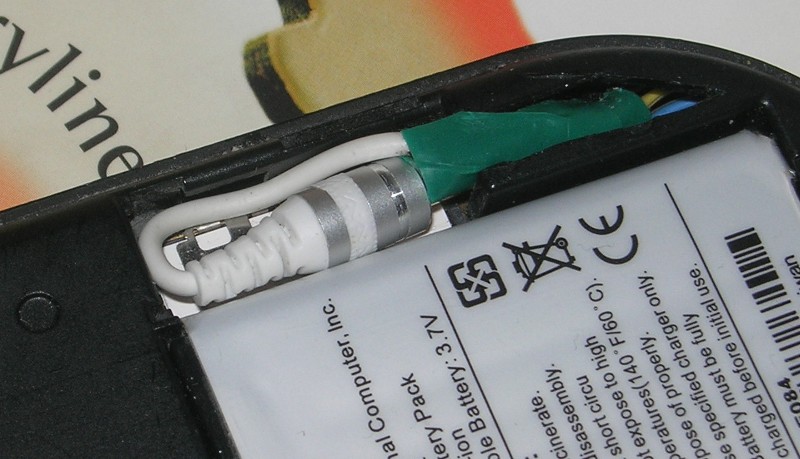
You need to be careful about getting the length of the cable right so it is long enough without any excess. Here you see it tucked away so the back cover can go over. The tip of the jack goes into the slot a little bit and as you might be able to see, I have a little bit too much cable so it buckles a bit an uses more space than I would like. I can clip the back on though, which is all that matters.

image

Finally I bought a short cable with a female 3.5mm on one end (I think there were 2 RCA on the other), cut that up, and soldered the 3 wires to my DB-9. And now I get console access by just popping the cover over (being careful not to let the battery fall out), easing the jack out, and plugging it in. Very useful.

Tedious bugs

Some bugs can be educational, but others are just tedious. I guess one still learns, but there must be a better way.

One of the many issues with my Open Phoenux GTA04 is that it hangs occasionally. Note that I'm not complaining about there being issues. I deliberately got this phone because I wanted to experiment and explore and if it all worked perfectly, where would the fun be? But there are issues and some are fun to fix. Others..

So anyway, it hangs. The symptom is that sometimes I ask it to wake up from suspend and it doesn't. The console is completely silent (no sysrq even). This seemed to correlate with someone trying to call or TXT me, and the message not getting through. So my initial assumption was that it would hang on resume. But only occasionally.

So to find out more I installed a kernel with debugging enabled (this is a 3.2 based kernel, it currently seems most stable), connected a serial console, (via a 3.5mm phono jack that I manage to wire up) and programmed the phone to set the RTC alarm every minute (fortunately I got the RTC alarm working!) so it would suspend and resume every 60 seconds. Then let it go.

Within about 30 minutes it would be very likely to hang.... providing the USB cable wasn't plugged in. Even after I discovered this requirement I kept leaving the USB cable in after copying a new kernel across, and so wasted lots of testing time - I would leave it for 30 minutes with the cable in, and then realise that it wasn't going to hang like that. Like I said: tedious.

The first hang showed that it was just after "PM: early resume of devices complete" so I added some more tracing and found that it was in resume_device_irqs(). Then more and it was just as interrupt 92. musb-hdrc - was enabled. There was a pending interrupt for this device and something got confused in there. A few more cycles (about an hour each!) found the bug for me.

omap2430_musb_set_vbus in omap2430.c contains:

            while (musb_readb(musb->mregs, MUSB_DEVCTL) & 0x80) {

                cpu_relax();

                if (time_after(jiffies, timeout)) {
                    dev_err(musb->controller,
                    "configured as A device timeout");
                    ret = -EINVAL;
                    break;
                }
            }

where 'timeout' is set one second in the future. Now looping for up to one second in code that can be called from an interrupt handler (as this is called from musb_stage0_irq), is pretty poor form to start with, but it is worse than that.

When resume_device_irqs() calls __enable_irq() which checks for pending interrupts and calls the handler, it does this with all interrupts disabled (and having interrupts disabled in an interrupt handler is pretty common, so this should not be a problem). With interrupts disable, the timer doesn't tick, so jiffies doesn't ever change. You can see where this is going, can't you.

If that interrupt is pending on resume, we get to this code and don't just spin for 1 second, we spin forever - with interrupts disabled. This exactly matches what I saw.

Working around this should be easy - just put in a maxiumum loop count ... I'll get to that in a minute. But why is there an interrupt at all?

Well the interrupt handler - generic_interrupt() in musb_core.c - reads the interrupt status registers and the only bit that is set is MUSB_INTR_SESSRQ in int_usb. i.e. There is a request to start a new session.

I think this means that the ID pin in the USB port was grounded. A USB-OTG cable will do this to request that the USB-OTG port switch to host mode and start talking to a gadget. This is what the code seems to be doing. In the first instance it turns on VBUS (the 5V power supply for the USB). So it all seems consistent.

However I never plugged anything into the USB port, and definitely didn't ground the ID pin. Remember that when I did have the USB port plugged in the problem didn't happen. Maybe that is related.

My guess is that some electrical noise either during suspend or resume triggers the interrupt. Maybe there really should be a capacitor on that 'ID' pin - it wouldn't be the first time that a missing capacitor had caused problems for Openmoko devices. I don't know how to test this, or whether to care if I can just make it work.

But it seems I cannot, at least not yet.

I imposed a 1000-loops count on that loop and it got further, but not much. It took about 5 second (so I can make the max a lot smaller), the interrupt handler gave up, and we moved on to resume all devices (having completed early-resume). It got up to the MMC drivers (hsmmc), stopped for 180 seconds, then the soft-lockup timer triggered. So not it is not hanging with interrupts disabled, so it might be easier to debug, but it is still hanging.

The stack trace shows

[4758.457092] mmcqd/0         D c0449efc  5644    59      2 0x00000000
[4758.463806] [] (__schedule+0x57c/0x608) from [] (schedule_timeout+0x1c/0x1d0)
[4758.473052] [] (schedule_timeout+0x1c/0x1d0) from [] (wait_for_common+0xd8/0x150)
[4758.482666] [] (wait_for_common+0xd8/0x150) from [] (mmc_wait_for_req_done+0x24/0xa4)
[4758.492645] [] (mmc_wait_for_req_done+0x24/0xa4) from [] (mmc_start_req+0x50/0x144)
[4758.502410] [] (mmc_start_req+0x50/0x144) from [] (mmc_blk_issue_rw_rq+0x78/0x4dc)
[4758.512115] [] (mmc_blk_issue_rw_rq+0x78/0x4dc) from [] (mmc_blk_issue_rq+0x404/0x434)
[4758.522155] [] (mmc_blk_issue_rq+0x404/0x434) from [] (mmc_queue_thread+0x98/0x100)
[4758.531951] [] (mmc_queue_thread+0x98/0x100) from [] (kthread+0x80/0x88)
[4758.540771] [] (kthread+0x80/0x88) from [] (kernel_thread_exit+0x0/0x8)


which suggests that a block io request to the mmc is being retried immediately on resume, and not getting anywhere. Now it could be that this is completely unrelated to the USB and I should run more tests, but not today.

The suspend/resume thread is :

[4758.669219] susman          D c0449efc  5060  1423   1420 0x00000000
[4758.675872] [] (__schedule+0x57c/0x608) from [] (__mmc_claim_host+0xb8/0x154)
[4758.685119] [] (__mmc_claim_host+0xb8/0x154) from [] (mmc_sd_resume+0x34/0x5c)
[4758.694458] [] (mmc_sd_resume+0x34/0x5c) from [] (mmc_resume_host+0xc8/0x15c)
[4758.703704] [] (mmc_resume_host+0xc8/0x15c) from [] (omap_hsmmc_resume+0xa0/0xe4)
[4758.713317] [] (omap_hsmmc_resume+0xa0/0xe4) from [] (platform_pm_resume+0x44/0x54)
[4758.723114] [] (platform_pm_resume+0x44/0x54) from [] (pm_op+0x6c/0xb8)
[4758.731811] [] (pm_op+0x6c/0xb8) from [] (device_resume+0x190/0x228)
[4758.740234] [] (device_resume+0x190/0x228) from [] (dpm_resume+0x10c/0x244)
[4758.749298] [] (dpm_resume+0x10c/0x244) from [] (dpm_resume_end+0xc/0x18)
[4758.758178] [] (dpm_resume_end+0xc/0x18) from [] (suspend_devices_and_enter+0x1d0/0x22c)
[4758.768432] [] (suspend_devices_and_enter+0x1d0/0x22c) from [] (enter_state+0x12c/0x18c)
[4758.778656] [] (enter_state+0x12c/0x18c) from [] (state_store+0x94/0x118)
[4758.787536] [] (state_store+0x94/0x118) from [] (kobj_attr_store+0x1c/0x24)
[4758.796600] [] (kobj_attr_store+0x1c/0x24) from [] (sysfs_write_file+0x108/0x13c)
[4758.806213] [] (sysfs_write_file+0x108/0x13c) from [] (vfs_write+0xac/0x180)
[4758.815368] [] (vfs_write+0xac/0x180) from [] (sys_write+0x40/0x6c)
[4758.823699] [] (sys_write+0x40/0x6c) from [] (ret_fast_syscall+0x0/0x3c)


So it looks like it is waiting for the mmc device, which itself is hanging. My feeling here is that this is a very different problem. The block queue should block everything on suspend so no requests should be pending at this point. I guess I'm going to have to look into that some more.

So I've probably learned a bit, but really not much. Mostly just some very silly code in an interrupt handler, which took hours to find. Hopefully examining the block-device issue will be more fun.

UPDATE:

The MMC bug was fairly easy to find - the 'suspend' callback was simply not being called. This was easily fixed by applying commit 32d317c60e56c2a34463b51fc0336cc96b3e1735 from Linux-3.4.

So now my GTA04 doesn't crash on resume any more. Hurray.

A typical week in RAID-land

I should probably write more. I enjoy writing but don't do enough of it. I probably have Elisabeth Bennet's condition. She says to Darcy on the dance floor:

We are each of an unsocial, taciturn disposition, unwilling to speak, unless we expect to say something that will amaze the whole room, and be handed down to posterity with all the eclat of a proverb.

I sometime feel unwilling to write unless I'll say something to amaze the whole Internet. But I think I should try to push through that.

So what has happened this week? I doubt it is really a typical week as no week is really typical - I imagine them all outside my window screaming in chorus "We are all individuals". But I can't really know unless I record it, then compare it with future weeks.

A Nasty md/raid bug

There is a rather nasty RAID bug in some released versions of the Linux kernel. It won't destroy your data, but it could make it hard to access that data.

If you are concerned that this might affect you, the first thing you should do (after not panicking) is to gather the output of

mdadm -Evvvvs

and save this somewhere that is not on a RAID array. The second thing to do is read to the end of this note and then proceed accordingly. You most likely will never need use the output of that command, but if you do it could be extremely helpful.